Skip to content

For Savannah businesses

In front of them.In their pocket.On their itinerary.

One listing puts your business on the Savannah In My Pocket map, in visitors’ saved lists and on their itineraries, in the app and on the web.

That’s the goal. We’re brand new, so we won’t promise you crowds or quote numbers we don’t have. Here’s exactly what your business gets today, what’s still coming, and what it costs.

Free until the app launches · Then 60 days free · Then your price is locked for 12 months

Real screen · Try itExample business

Stays in your browser. We don’t save it.

Skip the interactive example
The Savannah In My Pocket business page for an example coffee shop, with Save, Share, Directions and Add to itinerary buttons.
The real business page from the app, with an example business. Scroll it. Tap Save, Add to itinerary or Reserve. Nothing you tap here is saved.
visitors to the Savannah area in 2025
12.9 million1visitors to the Savannah area in 2025
in visitor spending in 2025
$4.1 billion1in visitor spending in 2025

Those are Savannah’s numbers, not ours. Ours start at zero, and your dashboard will only ever show the real ones.

Part 1

Works today

In front of them

Be there when they’re deciding where to go.

When people open Savannah In My Pocket, in the app or on the web, these are the places your business can show up.

A pin on the map

Every approved business with an address gets a pin on the Savannah In My Pocket map. Tap it, and a card shows whether you’re open right now, with buttons to save you, see your full page or add you to an itinerary. Every pin looks the same, on every plan.

The home screen rows

The home screen has a row for each of these kinds of places. If your business fits one, it can show up in that row. Each row shows up to five places, and on the website, bigger plans come first. Signed-in visitors see the rows that match their interests first.

  • Coffee
  • Seafood
  • Live Music
  • Tours
  • Rooftop Bars
  • Brunch
  • Shopping
  • Sweet Treats
  • History and Sights
  • Date Night

Right now, near you

When a visitor taps Right now and picks eat, drink or do, the app shows up to three places that are open at that moment, within about a 20-minute walk, nearest first. It goes by your own posted hours. Any approved restaurant, bar, café, shop, tour or attraction can show up, on every plan. If a Premium or Enterprise business is one of the three, it’s marked Sponsored. Only one place is marked Sponsored at a time.

Your own page

Once you’re approved, your business gets its own page with your photos, your posted hours, whether you’re open right now, directions and reviews. Visitors can save you, share you, add you to an itinerary, and tap Reserve if you take reservations.

In your dashboard: how many times people opened your page.

Interactive exampleSample data
Skip the interactive example
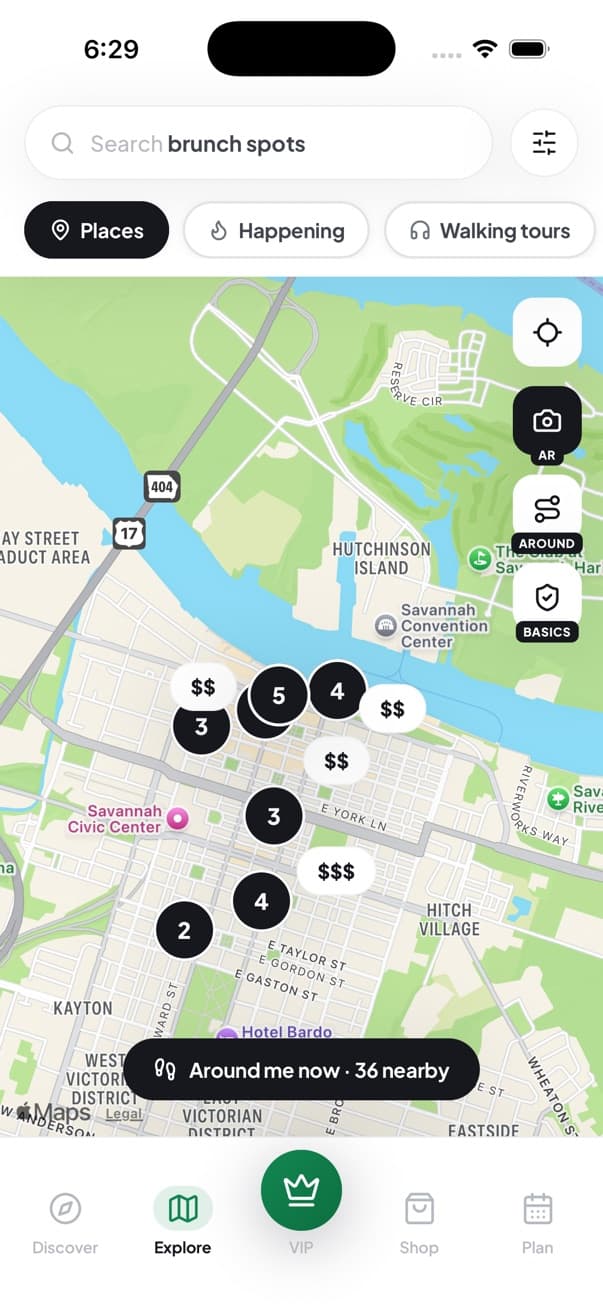
The Explore map in the Savannah In My Pocket app, showing places across downtown Savannah
The app’s Explore map with example places. Your Business is the pin that’s open: tap around, or view its page.

More ways to be found are on the way.See what’s coming soon

Part 2

Works today

In their pocket

Stay with them after they find you.

Once visitors find you, they can keep you close, in the app and on the web.

Saved, and on their lists

Visitors can heart your business and add it to lists they make and name themselves, so you’re waiting for them when they’re ready to go.

In your dashboard: how many people saved you, how that compares with the last period, and a day-by-day chart.

Shared with a friend

Your page has a share button, so visitors can send you to whoever they’re traveling with.

Reviews, and your replies

Visitors using the Savannah In My Pocket app can rate and review your business once the app has verified their visit. You can answer each review from your dashboard, and your reply shows under it in the app.

Built to stay on their phone

Savannah In My Pocket is built to be the app visitors keep open for their whole trip. Besides places to go, it helps them get around and covers the basics.

Real screen
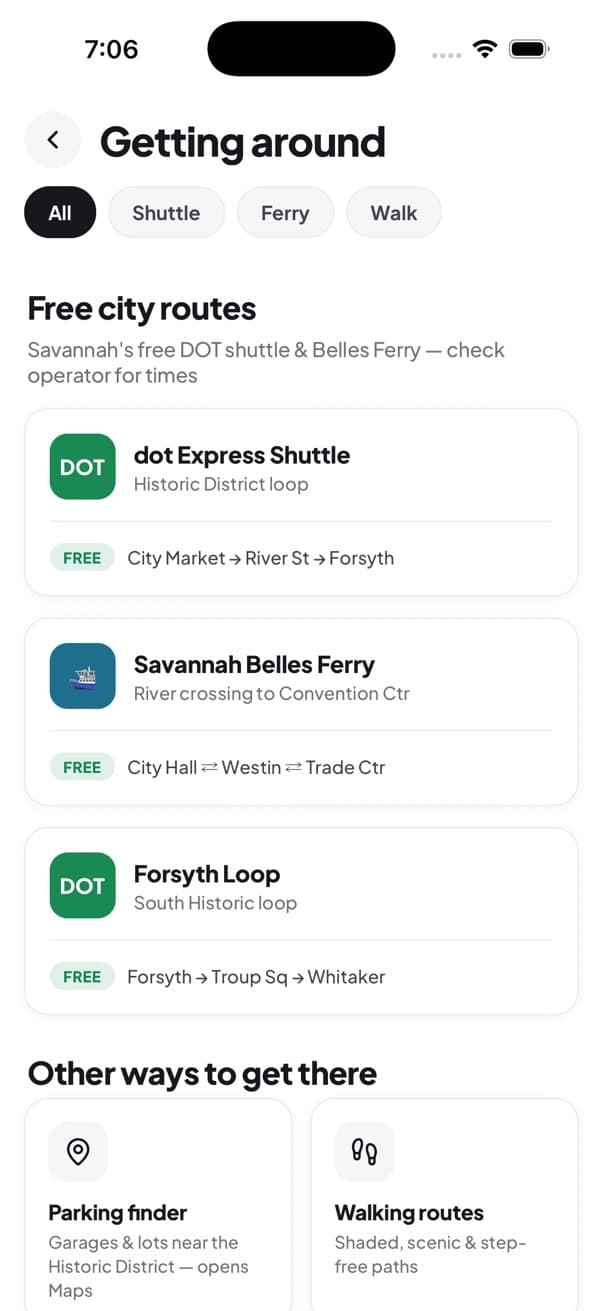
The Getting around screen listing Savannah’s free shuttle and ferry routes
Get aroundThe free shuttle and ferry routes
Real screen
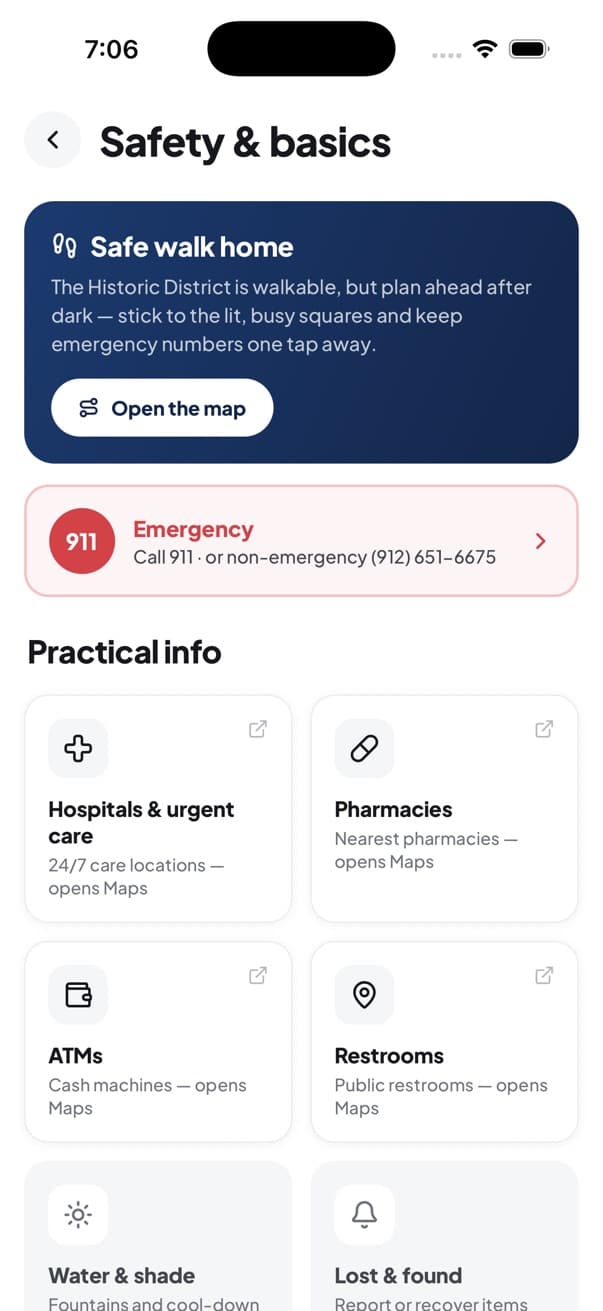
The Safety and basics screen with emergency numbers and practical info
Safety and the basicsEmergency numbers, pharmacies, restrooms
Interactive exampleSample data
Skip the interactive example
A visitor’s saved lists, with Your Business on one. Try making a new list.

More ways to stay in their pocket are on the way.See what’s coming soon

Part 3

Works today

On their itinerary

Get into their plans.

Savannah In My Pocket has an itinerary planner built in, in the app and on the web. A tap and a time, and you’re on their itinerary.

A tap and a time

Your page, and the card that opens from your map pin, both have an Add to itinerary button. Visitors tap it, pick a time, and you’re in their plan.

In your dashboard: how many times you were added to itineraries in the last 30 days.

If you take reservations

A table on their night

Guests can request a table from your page, in the app or on the website. You handle every request from your dashboard, and signed-in guests get a notice in the app when you confirm or cancel.

Interactive exampleSample data
Skip the interactive example
A visitor’s day, with Your Business at 11:00 AM. Open any place and tap Add to itinerary to add another.

More ways onto their itinerary are on the way.See what’s coming soon

Works today

Your business dashboard

Run everything above from one place. Every plan includes the full dashboard.

Interactive exampleSample data
Skip the interactive example
The business dashboard with sample numbers, made up for this example. Your dashboard only ever shows your real counts.

See what’s happening

  • Profile views, saves and itinerary appearances. See how many times people opened your page, how many saved your business and how often you were added to an itinerary, with week-over-week trends for views and saves, a day-by-day chart of your saves, and a 30-day count of itinerary adds. It’s all counted from real activity in the app.

  • How busy the app is. See how active app users are across Savannah over the last 30, 60 or 90 days.

Keep your listing right

  • Your details. Change your business name, category, description, phone number and website whenever you like.

  • Your photos. Add, remove and reorder up to 10 photos. The one you put first becomes the cover visitors see on your card in the app once you’re live.

  • AI writing help. Get a first draft of your listing description, Instagram captions, review replies and emails to win back past customers, written for your business’s name, type and city. Copy it, change what you like, and paste it where you need it.

Look after your guests

  • Reviews. See your ratings and reviews from app visitors, filter to the ones you haven’t answered yet, and post a public reply.

  • Reservation requests. If you take reservations, every request comes to your dashboard. Confirm, decline, seat guests, mark no-shows or completed, and search by guest, all on one page.

  • What needs you. A notifications panel gathers your pending reservation requests and your latest reviews, each one click from the page where you handle it.

  • Help, any time. A built-in AI help assistant answers how-to questions about reservations, analytics and plan pricing, any time of day.

What your dashboard doesn’t count

We don’t track phone calls, direction taps, menu views or what customers spend at your business, so your dashboard doesn’t show them. And while Savannah In My Pocket is new, your numbers will be small. A small real number is worth more than a big made-up one.

Works today

Everything you get, on every plan

All of this works today, and every plan includes all of it. Your size sets your price, not a list of features.

In front of them

  • A pin on the map
  • A chance to show up in your category’s row on the home screen, if your business fits one
  • A chance to show up in Right now when you’re open and close by (restaurants, bars, cafés, shops, tours and attractions)
  • Your own page, with your photos, posted hours, directions and reviews

In their pocket

  • Saves, and a place on visitors’ own lists
  • A share button on your page
  • Reviews in the app, with your public replies

On their itinerary

  • An Add to itinerary button
  • Table requests, if you take reservations

Your dashboard

  • How many times people open your page and how many save you, week to week, and how many times you were added to an itinerary in the last 30 days
  • How active app users are across Savannah
  • Edit your name, category, description, phone and website
  • Up to 10 photos, with the cover you choose
  • AI writing help
  • A reservations inbox
  • A notifications panel for requests and reviews
  • An AI help assistant, any time of day
Coming soon

What’s coming next

We’re building these now. They aren’t available yet, they aren’t part of what you pay for today, and we won’t put dates on them until they’re ready.

Coming soonIn their pocket

Your VIP perk

You’ll set one offer, like a free item, an add-on, money off or skip-the-line, with an optional daily limit. VIP pass holders will claim it at your counter on a live, one-time-use screen with a 60-second timer that a screenshot can’t fake, and your dashboard will count every redemption.

The VIP pass is sold by Savannah In My Pocket, and the pass money stays with us. Your perk doesn’t earn you a share of it.

Cost: Included in every plan.

Real screen
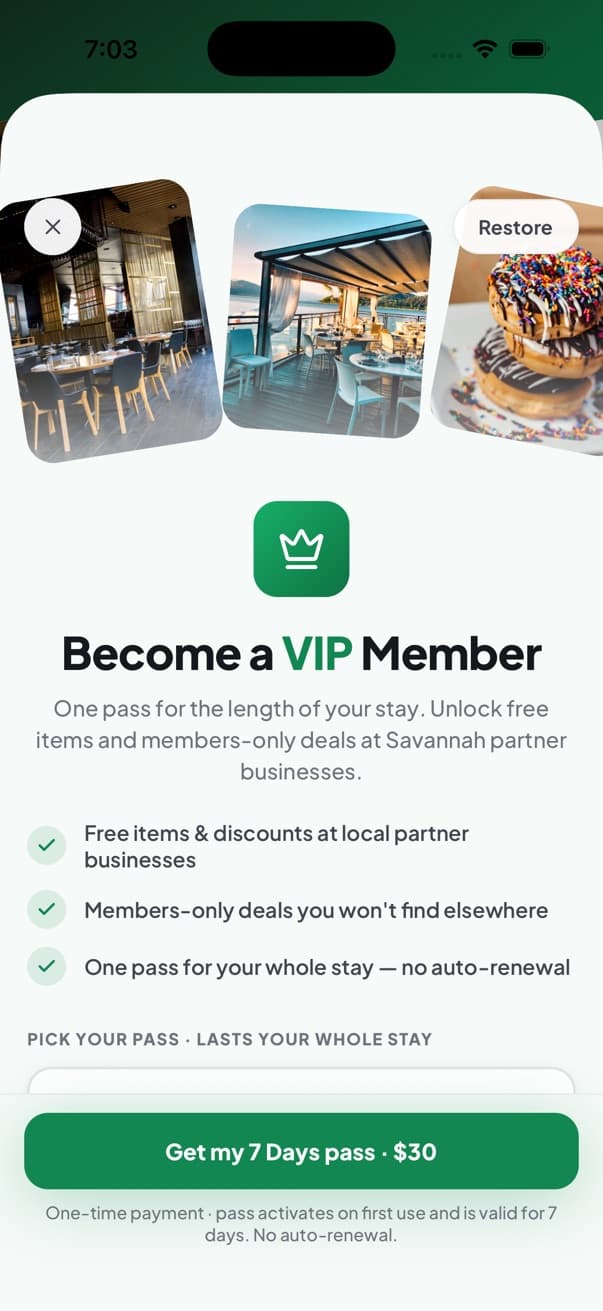
The VIP pass sheet in the Savannah In My Pocket app, headed “Become a VIP Member”
The VIP pass in the app today.
Coming soonIn front of them

Sponsored spots

You’ll be able to book a spot at the top of the Discover screen in the app, clearly labeled Sponsored, for just the days you choose.

Cost: Extra, priced per day.

Coming soonIn their pocket

Push alerts

You’ll be able to pay to send an alert to people using the Savannah In My Pocket app who have turned on notifications and opened the app in town in the last day. You’ll aim it at the whole city, one district, or up to 2 miles around your door.

Today an alert would reach no one, so it isn’t on sale yet.

Cost: Extra, priced by your plan.

Coming soonIn their pocket

The Local feed

You’ll be able to post time-limited specials and deals to the Local feed in the app, where Savannah residents can follow your business. Each post will get an automatic quality check and come down by itself when it ends.

Cost: Free to post.

Coming soonOn their itinerary

Stops on AI trip plans

Travelers using the AI trip planner in the app will be able to get listed Savannah businesses added as stops on their day-by-day plans, and your dashboard will show how many itineraries you appeared on. It won’t be on the website, and no business is ever guaranteed a stop.

Cost: Nothing extra.

Coming soonOn their itinerary

Tour bookings

Tour operators will be able to list tours, set start times and group sizes, and take bookings inside the app, then manage them from the business dashboard.

Cost: Not announced yet.

Coming soonSelling in the app

Your shop in the app

You’ll be able to sell your experiences and products in the Savannah In My Pocket shop. Buyers will pay by card, and you’ll get paid through Stripe to your bank, with a record of every sale. If a customer reports a problem with an order, our support team will settle it, and you’ll see the details and the outcome in your dashboard.

Cost: You keep 90% of each sale. We keep 10%.

Pricing

Your size sets your plan

You don’t pick a plan. It’s set by the size of your business: how many locations, seats and staff you have. Every plan includes your listing and the full business dashboard.

Starter

$300a month

About $10 a day

For smaller businesses

Growth

$600a month

About $20 a day

For mid-size businesses

Premium

$1,200a month

About $40 a day

For larger businesses

Enterprise

Custom

For arenas, convention centers, resorts and multi-location groups

Same tools on every plan. Bigger plans are listed ahead of smaller ones in the website’s category lists. A small café just doesn’t pay what a large restaurant group pays.

Free until launch, then 60 days

You pay nothing while the app is on its way, and nothing for 60 days after it’s live. That’s every plan.

Your price, locked for 12 months

When your free time ends, your plan’s price stays the same for your first 12 months of paying.

Card on file

We ask for a card when you set up. It isn’t charged until your free time ends.

Month to month

No long contract. You’re billed each month at your plan’s price.

What does my plan cover?

Today, your plan’s price covers everything under “Everything you get.” A few things under “Coming soon” will cost extra when they open. Each one is marked there, and you choose whether to use them.

See what’s coming soon

Questions owners ask

How many people use the app?

Savannah In My Pocket is brand new and the app isn’t out yet, so we don’t have visitor numbers to show you, and we won’t make any up. What we can show you is the city: 12.9 million visitors spent $4.1 billion in the Savannah area in 2025.1 As people start using the app, your dashboard counts their real activity: how many times people view your page, how many save you, and how often you’re added to an itinerary.

Then why sign up now?

Because right now it costs nothing. You pay nothing until the app is out and nothing for 60 days after, and your price is locked for your first 12 months of paying. Your page, photos and hours are ready on day one, when the first visitors open the app.

What’s the catch?

We’d rather you start paying when visitors can find you. You set up now, your page is ready on launch day, and your card isn’t charged until your free time ends. Month to month after that.

Who’s behind this?

Jacob Archer, a Savannah native who has guided about 8,000 visitors around this city as a private driver. He’s setting up the first businesses himself. Write to hello@savinmypocket.com.

How is my plan decided?

By the size of your business: how many locations, seats and staff you have. You tell us about your business when you set up, and that sets your plan. Starter is $300 a month, Growth is $600, Premium is $1,200, and Enterprise is custom.

Do bigger plans get more tools?

No. Every plan includes the full business dashboard and everything under “Everything you get.” What your plan does change is where you’re listed. Bigger plans are listed ahead of smaller ones in category lists and in the website’s home screen rows. Premium businesses can be picked for the featured spot at the top of the home screen, and a paying Premium business shows a Premium badge on the website. In Right now, a Premium or Enterprise business is marked Sponsored, and only one place is marked at a time. During your free time, you’re listed like a Premium business.

Do I need a card to start?

Yes. We ask for a card when you set up your plan. It isn’t charged until your free time ends: until the app is out, plus 60 days. After that, you’re billed each month at your plan’s price, and that price stays the same for your first 12 months of paying.

Is there a contract?

Plans are month to month, with no long contract.

How soon can I go live?

Once your listing is approved, it goes live in the app and on the web. We don’t promise a set time.

I’m not a tech person. Who sets up my listing?

You do, in your business dashboard. If you can fill in a form and add photos, you can do it. AI writing help can draft your description, and a built-in help assistant answers how-to questions any time of day. If you’d rather we set it up with you, email us at hello@savinmypocket.com.

What kinds of businesses is this for?

It’s built for Savannah restaurants, bars, coffee shops, shops, tours and attractions. Run something else? Some spots in the app, like Right now, only show those kinds of places, so email us at hello@savinmypocket.com and we’ll tell you straight what you’d get.

We have more than one location. What then?

Email us at hello@savinmypocket.com before you sign up, and we’ll work out your plan with you. Right now, one account runs one listing.

When will the coming-soon features open?

We don’t put dates on them until they’re ready. Anything marked “Coming soon” isn’t part of what you pay for today.

Get started

Claim your founding terms

Tell us about your business, and we’ll email you the next step to finish setting up your listing. More than one location? Email us before you sign up, and we’ll work out your plan with you.

How it works

  1. Fill in the form

    Your business name, your name, your email and what kind of business it is. Your phone number is optional.

  2. Check your email

    We’ll email you the next step to finish setting up your listing.

  3. Set up your listing

    In your business dashboard, add your photos and details, and tell us your size so we can match your plan. We ask for a card, and it isn’t charged until your free time ends.

  4. Go live

    Once your listing is approved, it goes live in the app and on the web, and your dashboard starts counting.

  • Free until the app launches
  • Then 60 days free
  • Price locked for 12 months
  • Month to month

Tell us about your business

We’ll email you here to set up your listing.

Rather email? Write to us at hello@savinmypocket.com.

Sources

  1. 1. Tourism Economics’ 2025 tourism impact study, as reported by the Savannah Chamber, May 27, 2026. savannahchamber.com